Set a target ratio
Choose the drive-to-recovery ratio you want for the row, for the water or for the erg, sculling or sweep.
Rower Rhythm for Apple Watch
See an estimate of your drive-to-recovery ratio and your stroke rate live on your wrist, on the water or on a rowing machine.
Apple Watch · watchOS 26 or later · iPhone companion · iOS 26 or later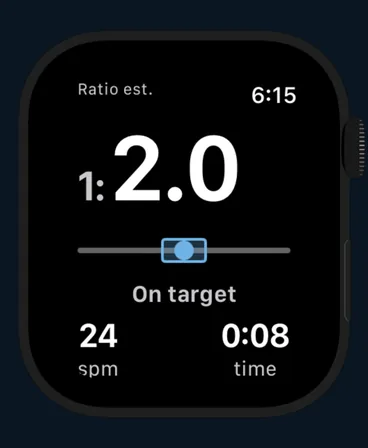
How it works
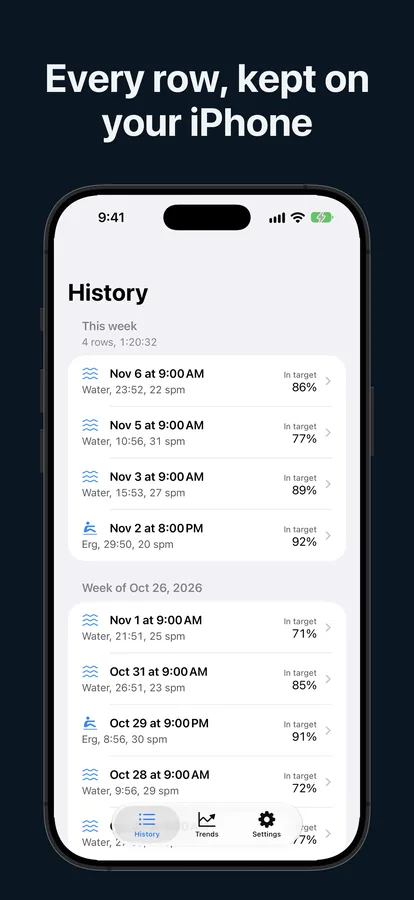
Rower Rhythm needs an Apple Watch. Your iPhone keeps every row once it has synced from the Watch.
Choose the drive-to-recovery ratio you want for the row, for the water or for the erg, sculling or sweep.
The Watch shows an estimate of your ratio and your stroke rate from the motion of your wrist, plus time. On the water it also measures distance from GPS.
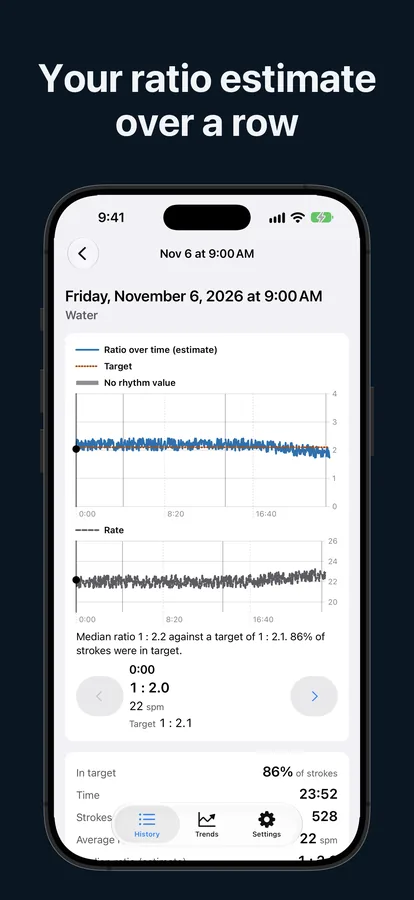
After each row you get a summary, and the iPhone app shows the ratio and the rate over the whole row.
See it in action
Real screens from the app. Every ratio, rate and steadiness value is an estimate.
Features
A training aid for your own rowing, kept simple.
Drive-to-recovery shown as 1 : 2.0, estimated from the motion of your wrist.
Strokes per minute, live on the Watch next to the elapsed time.
On the water or on a rowing machine; sculling or sweep, inside or outside hand. On the water, distance comes from GPS.
Pick a target for each row and see at a glance whether your recovery is short, on target or long.
Time, strokes, average rate, median ratio, share of strokes in your target range and distance on the water.
Each row is saved as a rowing workout. On the erg you can keep numbers only if another app already records the workout.
Browse your rows with the ratio and the rate over the row.
A tap on your wrist when your recovery runs shorter than your target.
From 0 to 100: how evenly your drive-to-recovery split repeats over your recent strokes.
Your ratio and steadiness by stroke rate, across your rows.
A CSV file with every detected stroke, for your own analysis.
RowerRhythm Pro
RowerRhythm Pro is a one-time in-app purchase, handled by Apple. It adds:
The live ratio, the stroke rate and the summary work without Pro. Restore purchase is on the Pro sheet and in Settings on the iPhone.
About the numbers
Drive runs from the catch to the finish; recovery is the rest of the stroke. Rower Rhythm estimates both from the motion of your wrist, so every ratio, rate and steadiness value is an estimate, not a measurement of your blade, handle or seat.
Accuracy has not been validated on a device. Use the numbers to follow your own rowing over time, not to compare yourself with other rowers or machines. Rower Rhythm is a training aid, not a medical device, and it gives no medical advice.
Support
Short answers below. If yours is not here, email a real person.
An Apple Watch running watchOS 26 or later, with its paired iPhone running iOS 26 or later. Rower Rhythm shows its numbers on the Watch; the iPhone keeps your rows.
The iPhone shows a row once a row finished on your Watch has synced to it. The Watch and the iPhone sync directly with each other. Finish a row on the Watch, then open the iPhone app.
The screen locks against water when a row starts. Press and hold the Digital Crown to unlock it.
That message appears until the Watch detects rowing strokes from the motion of your wrist. Once strokes are detected, the ratio and the stroke rate appear.
Open the Pro sheet and tap Restore purchase. You can also restore it in Settings on the iPhone. Purchases are handled by Apple.
The app estimates the drive and the recovery from the motion of your wrist. It does not measure your blade, handle or seat, and its accuracy has not been validated on a device. It is a training aid, not a medical device, and it gives no medical advice.
The developer never receives your rows. They stay on your Apple Watch and iPhone, in Apple Health when you save them there, and in any file you export yourself. The app has no account, no ads, no analytics and no tracking. Details are in the Privacy Policy.
In the app, use Delete row for one row or Delete all data for everything. Workouts saved to Apple Health are managed in the Health app.
Email rowerrhythm@xymex.app. It helps to include the app version, your Watch and iPhone models and their software versions, whether the row was on the water or on the erg, and what you saw compared with what you expected.
Questions, bug reports and ideas are welcome. We read every message.
Email: rowerrhythm@xymex.app